Managed by Claude or ChatGPT
Let your AI assistant set up and check your forms
Formsunrise has a built-in connector (an MCP server) for AI assistants. Paste one address into Claude, ChatGPT, Cursor or Claude Code, sign in and approve access. Your assistant can then create sites and forms, change form settings, add the form code to your website and tell you which submissions came in.
- Works with Claude (web, desktop and Claude Code), ChatGPT, Cursor and VS Code
- Secure sign-in and approval; disconnect an app at any time
- Choose which workspace each connected AI app may use
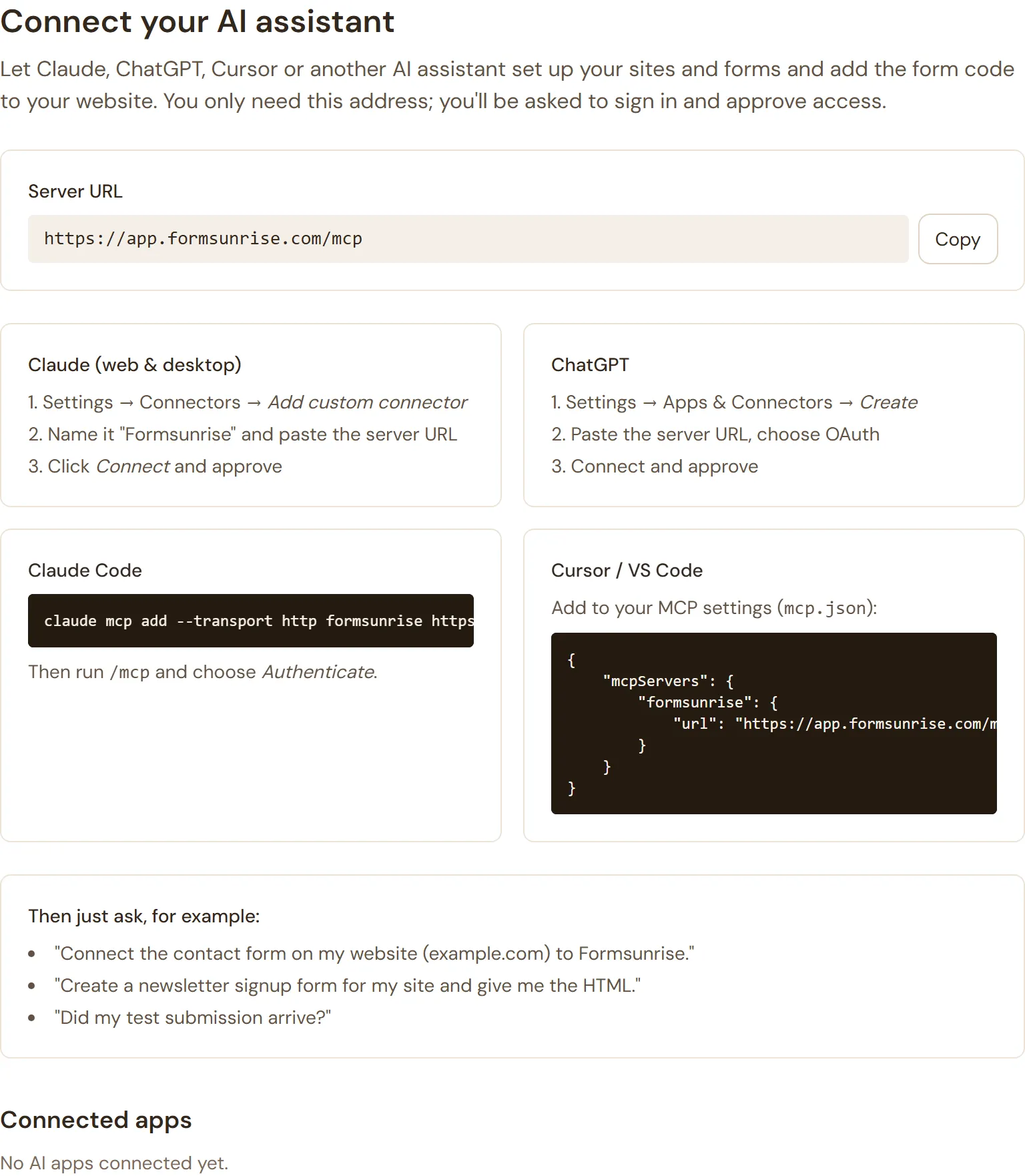
Then just ask:
- “Connect the contact form on my website to Formsunrise.”
- “Create a newsletter signup form for my site and give me the HTML.”
- “Did my test submission arrive?”
More of what Formsunrise does
-
Simple setup
Create a form, copy its address into your form's action attribute, done.
-
Fields recognised automatically
No form builder. Whatever fields your form has show up in your inbox.
-
Good for SEO and speed
Your form stays plain HTML on your own page, so it loads instantly and search engines see it.
-
Email management
Notifications for your team and a confirmation email for your visitor.
Connect your first form in five minutes
The Free plan costs nothing and needs no credit card details. Keep your own form, change one attribute, and submissions start arriving.